
I’ll tell you how to leverage AI for YouTube creation step by step. You’ll find out what AI tools can help with YouTube content creation and editing, what to do with them, and how to scale your YouTube channel exponentially.
The entire YouTube platform and the way of creating content has changed radically. Now, the fight for viewership is a big challenge. The main weapons in this race are productivity, quality of editing, visual effects, and speed of publication. All this is a huge workloads for a single creator. The long and complicated algorithm of creating content, market research, writing scripts, recording and editing videos, thumbnails, and SEO optimization can overwhelm even the most enthusiastic YouTuber.
However, getting to know how to use ai for youtube can completely change the situation.
The application of artificial intelligence (AI) is not designed to mass-produce boring, banal, and gray content. Instead, it allows you to create high-quality YouTube videos with a small expenditure of time and effort. Thanks to various AI tools, you can automate many monotonous and tedious processes and devote more time and effort to more meaningful things, such as developing a strategy for your channel and connecting with your audience.
Whether you run a talk show, tech review channel, education niche, or faceless YouTube channel, this guide will help you find the right tools for all stages of the content creation process.
Phase 1: AI-Powered Niche Research & Video Ideation
A great video starts long before the making process. If the idea does not have demand and psychological appeal, all the time and money spent on high-quality production will be wasted. AI technology helps to find the most demanded niches and video ideas quickly. It studies market trends, videos’ performance, and audience psychology to create a concept that people are genuinely interested in.
1. High-Demand Topic Generation
Large language models can be employed as virtual channel strategists. Instead of staring blankly at a word document wondering what video ideas to think of for your channel, you can utilize prompt engineering to generate hundreds of ideas based on what your audience is searching for
- Best AI Tools for This Article:
- ChatGPT , Claude (Anthropic), Google Gemini, VidIQ, TubeBuddy.
- How to use them:
- Plug in your highest performing video titles or other creators that make similar videos and ask the LLM for patterns, what’s missing in the sub-niches, or controversial angles.
- Practical Prompt Example:“Act as a YouTube Channel Strategist for a channel focused on personal finance for beginners. Analyze the gap between basic budgeting tutorials and real estate investing. Give me 15 video ideas that use curiosity gaps or urgency.”
2. Title & Hook Validation Before Production
Your title determines your Click-Through Rate. That’s why we turn to AI to experiment with various options that appeal to human psychology and algorithms.
Top Tools: VidIQ (AI Title Generator), Gemini, ChatGPT
The Strategy: Create 10-20 variations using curiosity, high stakes, negativity bias, and contrast.
Phase 2: Writing High-Retention Scripts with AI
The audience retention is one of the critical factors for YouTube’s ranking system. Essentially, the algorithm “punishes” any videos which make the viewer leave within the first 30 seconds. Using AI tools can help create hooks and keep the narrative engaging to keep the audience on board.
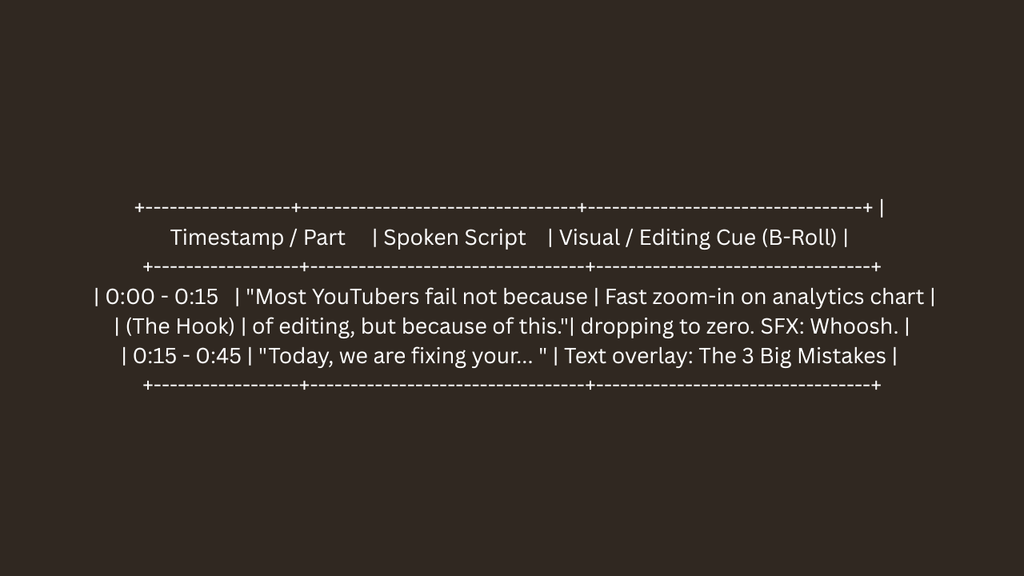
1. Structuring Script Outlines with Visual Cues
Instead of asking AI to write a full script instantly—which often leads to robotic, generic phrasing—instruct the model to output a structured table featuring visual and audio directions alongside the spoken text.
2. Customizing Tone and Eliminating “AI Voice”
To keep your script authentic,upload transcriptions of your previous videos to it to allow the AI to learn and mimic your word choice, phrasing, and sentence structure.
Secondly,make sure it doesn’t use generic AI phrases like “In todays fast-paced digital world,” “Delve,” or “Unleash your potential.”
- Top tools for scripting include
- Claude , best for narrative structure, ChatGPT (use custom GPTs trained on your own transcriptions), and Jasper AI.
Phase 3: Visual & Audio Production Enhancement
Recording audio and video used to suck up huge chunks of time in the past, but now with the latest developments in artificial intelligence, studio-quality audio cleaning, realistic voice-over, and video editing have become significantly expedited.
1. Studio Quality Audio Cleanup
Room echo, background noises, and varying levels of microphone volume can make even the best of videos sound amateurish. However, with AI-powered audio cleaning software, one is able to clean voice recordings from a phone’s microphone into professional broadcast-ready audio with the touch of a button.
- Top tool: Adobe podcast AI (enhance speech)
- How it can help: Automatically removes unwanted background noises such as hums and fans and balance out your voice frequencies
2. Realistic AI Voices + Localization
For people who are doing faceless vlogs or want to expand their content to a different language audience, this new AI voice technology can generate realistic voices with natural breathing and pacing for different languages.
- Top Tool: ElevenLabs.
- Use Cases:
- Voiceover generation for documentary or faceless channels.
- One-click AI dubbing into Spanish, German, French, or Hindi using your original voice tone.
- Fixing mistyped lines without re-setting up cameras or microphoning.
3. Generative AI B-Roll & Footage
Instead of searching stock sites for hours to find matching footage, text-to-video AI allows YouTubers to construct custom, cinematic visual overlays directly from a prompt.
- Top Tools: OpenAI Sora, Runway Gen-3, Google Veo, LTX Studio.
Phase 4: AI Video Editing & Workflow Automatio
Editing is typically the biggest bottleneck for creators. AI editing tools automate the boring tasks—like cutting silences, adding auto-captions, and isolating subjects—cutting editing time by up to 70%.
1. Transcript-Based Video Editing
Rather than cutting video clips on a timeline, transcript-based editors convert videos into text. By deleting a word or phrase from the transcript, any corresponding moment can be deleted from the timeline.
- Top tools: Descript , Gling AI , VEED.io .
- The best part? You can delete “uhs” or “ums” or “you know” from an entire 30 minute recording with a click of a button.
2. Automated Repurposing for YouTube Shorts
The best YouTube long-form content creators should repurpose their content into YouTube Shorts because the creator will expand their reach. The creator’s uploaded videos to YouTube will be analyzed by the AI, and it will pick out the best parts for the creator. The Best 7 AI Video Editing Tools in 2026e AI will also adjust the video to fit the 9:16 ratio and will add animated captions.
- Top Tools: OpusClip, Captions.ai, Klap.
- Workflow: Drop a long YouTube video link into the tool, and receive 10 to 15 styled vertical Shorts ready for immediate publication.
Phase 5: Designing High-CTR YouTube Thumbnails with AI
A video cannot perform without clicks.Your thumbnail is doing 80% of the hard work to win the battle of first impression on the YouTube homepage. With the help of AI image generators and editors, even those who do not have design skills can create amazing visuals for their thumbnails easily and quickly.
1. AI Background Isolation & Image Cleanup
- Top Tools: Canva Magic Studio, Adobe Photoshop (Generative Fill), Fotor, Clipdrop.
- How to Use: Isolate your face or body from a photo with a single click, expand missing backgrounds using generative fill, or remove unwanted objects seamlessly.
2. Generative Visual Elements & Expressions
- Top Tools: Midjourney, Leonardo. Ai, Canva AI.
- Use image prompt based engines to generate high contrasting backdrops, explosions, gadgets, glowing text effects or avatars to compliment dark mode
Phase 6: YouTube SEO, Metadata & Publishing Optimization
With your video and thumbnail ready optimizing your metadata correctly will ensure the YouTube algorithm indexes your upload correctly and targets the right audience.
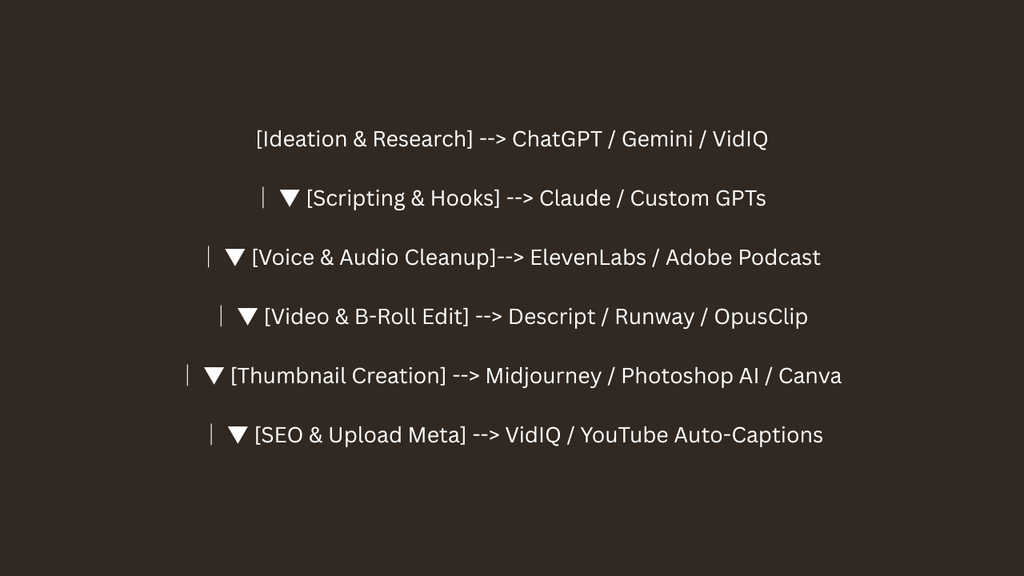
1. Generating Keyword-Rich Metadata
Write natural descriptions with your niche keyword included in the first two sentences for improved crawlability.
- Tools: VidIQ, ChatGPT and TubeBuddy.
- Prompt example: “Write a 200 word SEO description for a YouTube video titled ‘(how to use ai for youtube content creation)’.Include the focus keyword ‘how to use ai for youtube content creation’ in the first 2 sentences. Naturally add tags, chapter timestamps, and related topics.”
2. Enhanced Closed Captions
YouTube’s automatic captions are rarely fit for purpose. They lack punctuation, technical vocabulary, and paragraph breaks. However, uploading a captions file created by an AI tool such as HappyScribe or Descript will enable the captions to be accessed by people with hearing impairments and/or provide better text for YouTube’s search engine to ingest.
Essential rules: Maintaining monetization & authenticity
While using AI for YouTube content creation provides unprecedented speed, over-automating your channel carries major risks. YouTube’s algorithm and monetization policies actively penalize low-effort, mass-produced content.
- Comply with YouTube Disclosure Rules: Always check YouTube’s upload setting box when your video contains altered or synthetic content (such as deepfake visuals or synthetic voice clones of real people).
- Avoid 100% Automated “Faceless Slop”: If your video features a completely synthetic voice, generic stock footage, and an AI-generated script without human editing, YouTube may flag your channel for Reused or Repetitive Content, disqualifying you from the YouTube Partner Program (YPP).
- Add Personal Experience & Opinion: AIs cannot share personal experience, anecdotes, successes, failures, emotions, etc. You should write the article using AI, but add your own personal opinion on top of it.
- Check Everything: AIs can confidently and convincingly lie to you about virtually anything. Make sure the information you publish is correct by fact checking it elsewhere.


Pingback: Best 7 AI Video Editing Tools in 2026: Automated Cuts & Voice Creation - Gen Z